v1.13.1 - Paycom, Inventory Images, Training Tracker Usability, and Hosting Page Upgrades!
Quality of life updates for the Training Tracker, Inventory Tracker, and the Hosting Page! Also releasing our first pass at Paycom integration and some other small adjustments.
Hosting and Overview Page
Ever wondered how long a group sat in the lobby before their game started? Well now you know! Also view notes from Resova bookings through Drawbridge.
Track group check-in time to see how long since they arrived
This shows up in the menu that pops up once the booking has been claimed

Access booking notes from Resova on the hosting page
The hosting page will show a booking has notes by underlining the customer name. Clicking the underlined name brings up a box with the notes from Resova inside. You can also see these in the menu shown after the game has been claimed.

Any Kids Mode games will now have an icon indicator on the hosting and game master page
Games lost will show as 0% escape rate instead of “-” on overview metrics
Fix time added overview metric to show amount of time per game properly
Game Master Page
Small changes that may help increase hint response time!
Add hints inside of alert popup for quick access
Brings the hints for the current objective up with the hint alert for easy visualization and fast hint responses! Looks more like the autohint pop-up so there’s an easier transition to using autohint all the time.
You can now send custom hints from the autohint pop-up for fast clue customization!
Whatever is queued up in the custom hint box will be a customizable option alongside prewritten clues
Timekeeping Updates
Initial Paycom integration!
Employees with spaces at the end of their name will identify as the correct employee
Fix Optim8 integration deleting timeclock records overnight
Training Tracker improvements
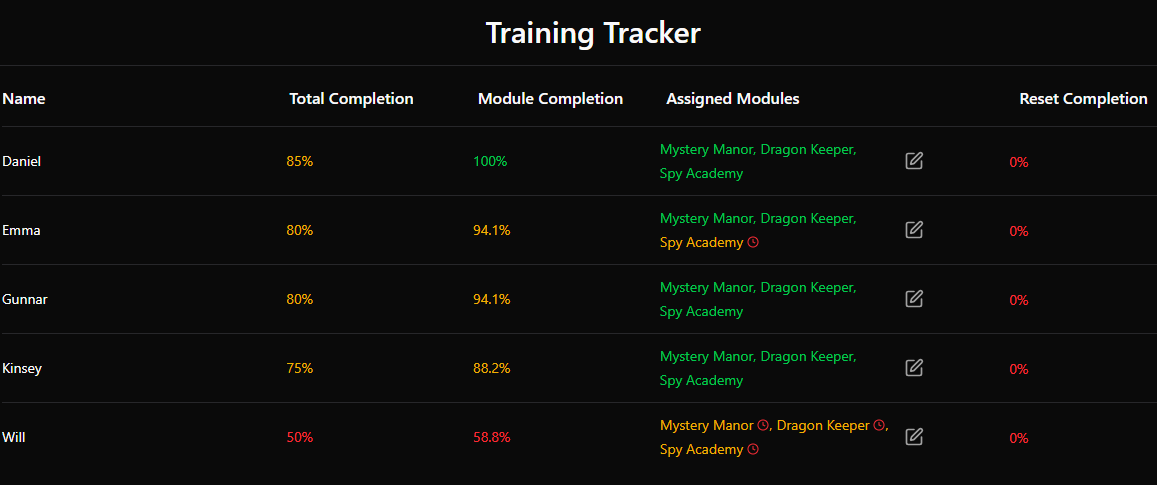
See trainee progress at a glance! Each module name will be color coded depending on how much the trainee has completed. Hover over reset percentage to see which games are still needed to meet 100%.
Colors for module completion:
Gray: No tasks completed
Yellow: Module in progress (at least one completed)
Green: All tasks completed for that module
Show what games have incomplete resets when hovering over reset percentage for an employee
No more digging around in settings! You can now change employee training module assignments directly from the Training Tracker page by pressing the plus button in the ‘assigned modules’ column.

Inventory Management Updates
Include photos and notes on your inventory items!
Add reference images and notes to items on the inventory management page
Images appear as a thumbnail that becomes bigger when clicked on. You can add images from a camera roll or take the photo from the device you’re using.
Preserve current inventory page when adding new items

Daily Tasks
Daily tasks notes are now used to “report an issue”
This adds items to the handyman punchlist directly from the daily task menu. No more loose notes that may not be seen by anyone.
Daily tasks will be marked as expired on Monday morning for previous week instead of 7 days after.
Game Analytics
Track device activations in game forensics page to verify game ran properly
Make game statistics smarter about determining final puzzle escape rates.
Uses second to last objective that has a time/duration set (for the ahead/behind timer). Defaults to second to last puzzle overall if no times are configured. This should improve accuracy for games that have an extra objective at the end.
Add customer zip code logging from Resova integration for analytics on local/tourist skews